
Spring AI: From Beginner to Expert
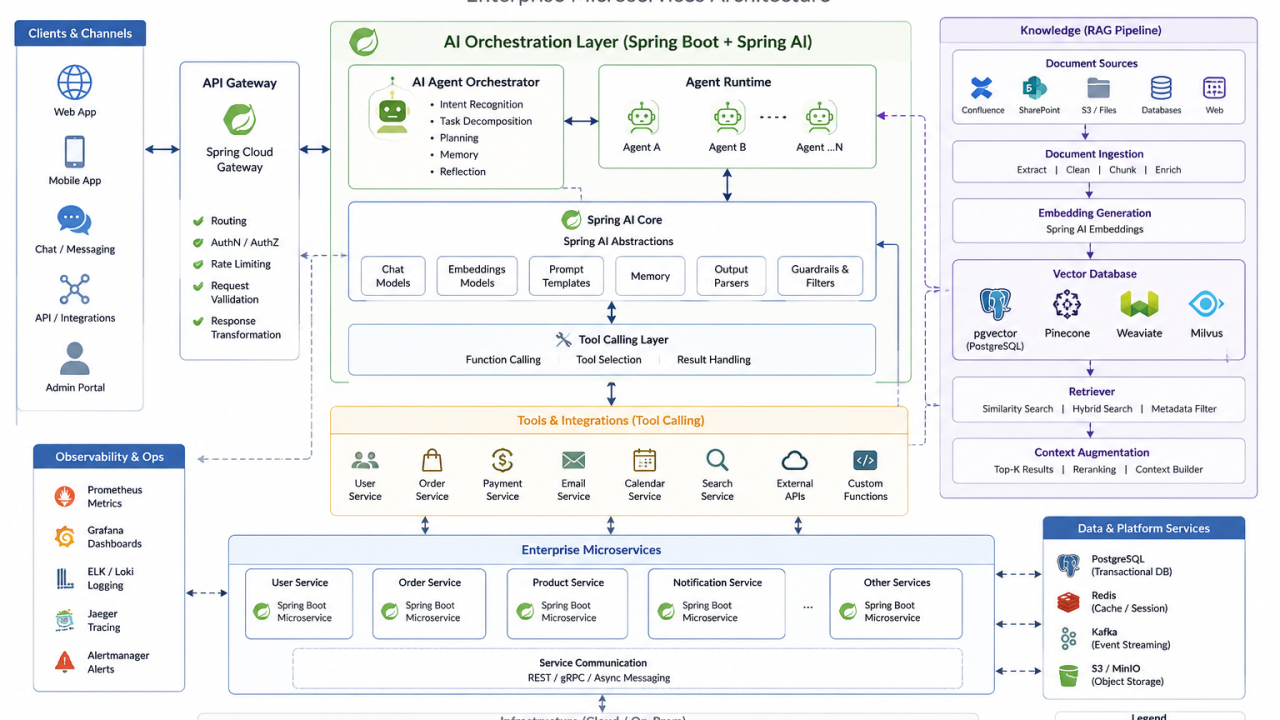
Artificial Intelligence is rapidly becoming a standard capability in enterprise applications rather than an experimental feature. Just as Spring Boot simplified cloud-native Java development, Spring AI is making it significantly easier for Java developers to integrate Large Language Models (LLMs), Retrieval-Augmented Generation (RAG), vector databases, and AI agents into production systems.
If you're a Java developer wondering where to start—or an experienced architect looking to build enterprise-grade AI applications—this guide walks through the journey from beginner to expert with practical examples.
What is Spring AI?
Spring AI is an official Spring ecosystem project that provides a consistent abstraction layer for integrating AI models into Java applications.
Instead of learning a different SDK for every model provider, developers work with familiar Spring concepts while switching between providers such as:
OpenAI
Azure OpenAI
Amazon Bedrock
Google Vertex AI
Anthropic Claude
Ollama (Local LLMs)
Hugging Face
Mistral AI
The programming model feels very similar to Spring Data.
String response = chatClient.prompt()
    .user("Explain Dependency Injection")
    .call()
    .content();
That's all it takes to start interacting with an LLM.
Why Spring AI Matters
Enterprise applications increasingly require AI capabilities:
Intelligent customer support
Internal knowledge assistants
Code generation
Document analysis
Fraud detection
Workflow automation
Semantic search
Personalized recommendations
Without Spring AI, developers often have to integrate multiple vendor-specific SDKs and manually handle authentication, prompts, embeddings, and model APIs.
Spring AI abstracts those differences so you can focus on business logic.
Getting Started
Add the dependency:
<dependency>
    <groupId>org.springframework.ai</groupId>
    <artifactId>spring-ai-starter-model-openai</artifactId>
</dependency>
Configure your API key:
spring:
  ai:
    openai:
      api-key: ${OPENAI_API_KEY}
Create your first AI service:
@Service
public class ChatService {

    private final ChatClient chatClient;

    public ChatService(ChatClient.Builder builder) {
        this.chatClient = builder.build();
    }

    public String ask(String question) {
        return chatClient.prompt(question)
                .call()
                .content();
    }
}
Congratulations—you've built your first AI-powered Spring application.
Prompt Engineering
A good prompt is often the difference between an average answer and an excellent one.
Instead of:
Explain Docker.
Try:
Explain Docker to a Java developer who already understands virtual machines. Include practical production examples.
Spring AI makes prompts reusable:
Prompt prompt = new Prompt("""
You are a senior software architect.

Explain event-driven architecture with Java examples.
""");
Structured Output
Enterprise applications rarely want free-form text.
Instead, map responses directly into Java objects.
record Customer(
    String name,
    String email,
    String phone
){}
The model can return structured JSON that Spring AI converts into Java types, making integration with existing services much cleaner.
Working with Embeddings
Embeddings convert text into vectors that capture semantic meaning.
Example:
Java Programming
Spring Boot
Microservices
Cloud Architecture
Each document becomes a numerical vector that enables semantic search.
Instead of searching for exact words, your application can find content with similar meaning.
Retrieval-Augmented Generation (RAG)
One of the most valuable enterprise patterns is Retrieval-Augmented Generation (RAG).
Rather than relying only on an LLM's training data, RAG retrieves relevant documents from your own knowledge base before generating a response.
The workflow looks like this:
User Question
      │
      ▼
Embedding Model
      │
      ▼
Vector Database
      │
Relevant Documents
      │
      ▼
Large Language Model
      │
      ▼
Final Answer
This approach allows AI assistants to answer questions using your organization's documentation, APIs, policies, or internal knowledge while reducing hallucinations.
Vector Databases
Common vector databases include:
PostgreSQL + pgvector
Pinecone
Milvus
Weaviate
Chroma
Redis
Elasticsearch
With Spring AI, switching between providers often requires minimal code changes.
AI Tools (Function Calling)
Modern AI applications don't just answer questions—they perform actions.
For example:
User:
Book a meeting tomorrow.
The AI can invoke:
bookMeeting(...)
Or:
What's the weather in London?
The AI calls:
weatherService.getForecast()
This capability transforms an LLM from a conversational interface into an application orchestrator.
Building AI Agents
Agents combine reasoning with tool execution.
A typical workflow:
Receive Request
      │
Reason About Task
      │
Choose Tool
      │
Execute Tool
      │
Observe Result
      │
Repeat If Needed
      │
Return Answer
Spring AI provides abstractions that simplify building these intelligent workflows.
Memory
Real conversations require context.
Without memory:
Who is Bill Gates?

...

Where was he born?
The second question loses context.
With conversational memory, the AI understands that "he" refers to Bill Gates and responds appropriately.
Multi-Model Applications
Enterprise systems often use multiple models together.
Example:
GPT-4 for reasoning
Claude for document analysis
Bedrock for enterprise deployment
Ollama for local development
Spring AI makes provider switching much simpler by exposing a consistent API.
Production Best Practices
When deploying Spring AI applications, consider more than just prompts.
Focus on:
Prompt versioning
Model selection
Token usage monitoring
Response caching
Guardrails
Rate limiting
Observability
Security
Cost optimization
Fallback models
Human approval for critical actions
These concerns become increasingly important as AI moves into production environments.
Enterprise Architecture
A scalable Spring AI architecture might look like this:
React / Angular
        │
API Gateway
        │
Spring Boot
        │
Spring AI
        │
────────────────────────
│ Chat Models
│ Embedding Models
│ Tool Calling
│ AI Agents
│ Memory
────────────────────────
        │
Vector Database
        │
Enterprise Documents
        │
PostgreSQL
        │
Kafka
        │
AWS
This architecture integrates AI capabilities into existing enterprise platforms rather than treating AI as a standalone system.
Common Mistakes
Teams new to AI often make avoidable mistakes:
Using AI for every problem instead of identifying high-value use cases.
Ignoring prompt testing and evaluation.
Skipping retrieval for knowledge-intensive applications.
Underestimating security and data privacy requirements.
Treating LLM output as always correct.
Failing to monitor token costs and latency.
Building tightly coupled solutions around a single model provider.
Avoiding these pitfalls can save significant time and cost.
Final Thoughts
Spring AI is more than another Java library—it represents a shift in how enterprise applications are built.
Just as Spring Boot transformed cloud-native development, Spring AI is helping Java developers integrate intelligent capabilities without abandoning the familiar Spring programming model.
Whether you're building a chatbot, an internal knowledge assistant, an AI-powered workflow, or a multi-agent enterprise platform, Spring AI provides a strong foundation for modern AI development.
The most successful teams won't simply "add AI" to their applications. They'll thoughtfully combine software engineering best practices, domain expertise, and AI capabilities to build systems that are more intelligent, more productive, and ultimately more valuable for users.
The future of enterprise Java isn't just cloud-native—it's AI-native.
What Spring AI feature are you most excited to explore: RAG, AI Agents, Tool Calling, or Multi-Model Applications? I'd love to hear your thoughts and experiences in the comments.