
Architecting Scalable Node.js Backends with TypeScript: From Clean Code to Enterprise Scale
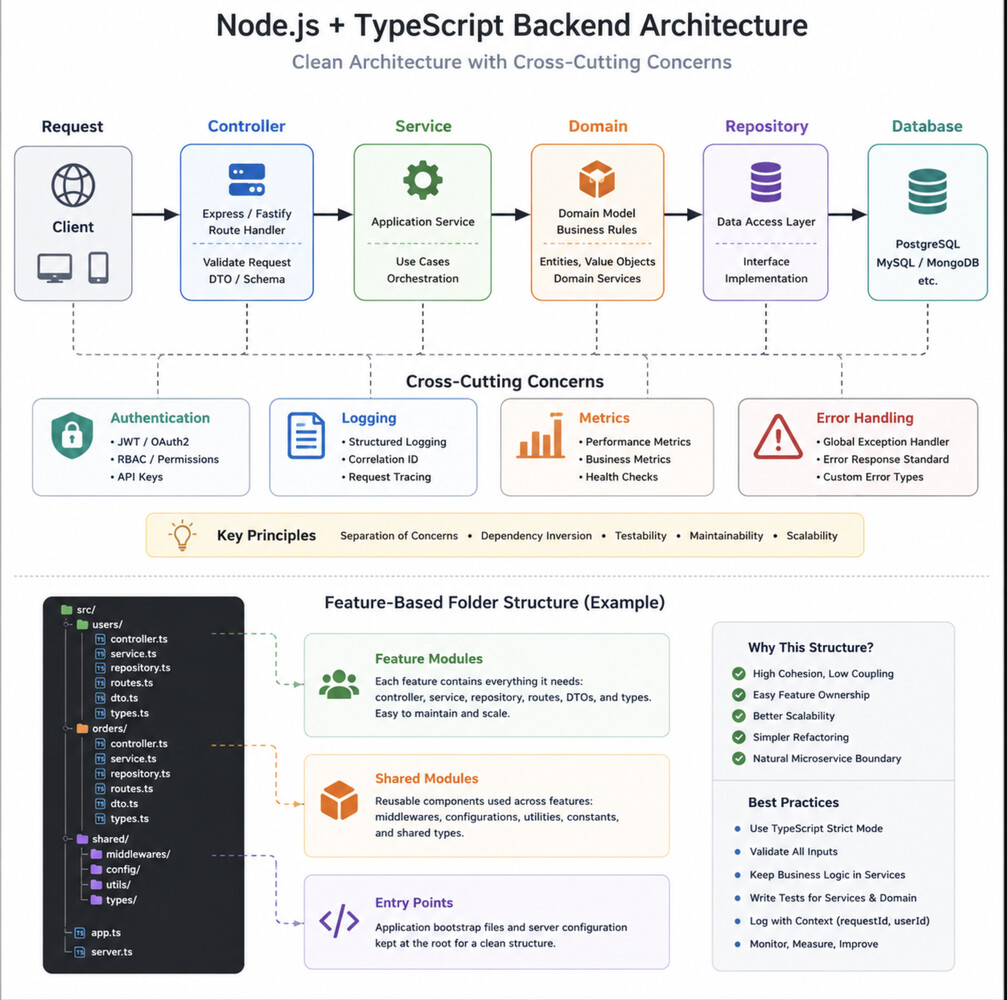
"The biggest challenge in Node.js isn't handling thousands of requests per second—it's keeping your codebase maintainable after thousands of commits."
Many Node.js applications start small.
A few Express routes.
A handful of services.
One database.
Everything lives inside a single server.ts.
It works... until it doesn't.
As more developers join the project, new features arrive, and microservices become inevitable, the biggest bottleneck is rarely Node.js itself.
It's architecture.
After working on large enterprise systems, I've learned that scalable backends are built long before they need to scale. Good architecture enables teams to move faster without creating technical debt.
Here's how I approach building production-ready Node.js backends with TypeScript.
1. Start with Feature-Based Architecture
One of the most common mistakes is organizing projects by technical layers.
controllers/
services/
repositories/
models/
utils/
This looks clean initially.
After two years, every folder contains hundreds of files.
Finding code becomes painful.
Instead, organize by business capability.
src/

├── users
│   ├── controller.ts
│   ├── service.ts
│   ├── repository.ts
│   ├── routes.ts
│   └── dto.ts
│
├── orders
│   ├── controller.ts
│   ├── service.ts
│   ├── repository.ts
│   └── routes.ts
│
└── payments
Benefits:
Better ownership
Easier refactoring
Natural microservice boundaries
Reduced coupling
Teams can work independently without constantly modifying the same folders.
2. Separate Business Logic from Framework Code
Express should only handle HTTP concerns.
Bad:
router.post("/orders", async (req, res) => {

    const user = await User.findById(req.body.userId);

    const product = await Product.findById(req.body.productId);

    if (!product.stock)
        return res.status(400).send();

    const order = await Order.create(...);

    res.json(order);
});
Everything is mixed together.
A better approach:
router.post("/orders", async (req, res) => {

    const result = await orderService.create(req.body);

    res.json(result);

});
Business logic belongs inside services.
Frameworks should be replaceable.
Your domain shouldn't care whether requests come from:
Express
Fastify
NestJS
GraphQL
gRPC
3. Use Dependency Injection
Avoid this:
const repository = new UserRepository();

const service = new UserService(repository);
Instead:
container.register({

    userRepository,

    userService

});
Benefits:
Easier testing
Loose coupling
Replace implementations easily
Better modularity
Enterprise applications rarely instantiate dependencies manually.
4. Make TypeScript Work for You
TypeScript isn't just JavaScript with types.
Use it to eliminate entire classes of bugs.
Example:
interface CreateUserRequest {

    name: string;

    email: string;

}
Instead of:
function createUser(data: any)
You now get:
autocomplete
compile-time safety
self-documenting APIs
Even better:
type UserRole =

    | "ADMIN"
    | "EDITOR"
    | "USER";
Impossible states become impossible.
5. Introduce Repository Pattern
Never let business logic know how data is stored.
Instead of:
await prisma.user.create(...)
inside services...
Use:
await userRepository.save(user)
Tomorrow you may migrate from:
PostgreSQL
MongoDB
DynamoDB
Your services remain unchanged.
6. Validate Everything
Never trust client input.
Example using Zod:
const schema = z.object({

    email: z.string().email(),

    age: z.number().min(18)

});
Then
schema.parse(req.body);
Benefits:
safer APIs
better error messages
fewer production bugs
TypeScript validates compile time.
Zod validates runtime.
You need both.
7. Keep APIs Versioned
Don't expose breaking changes.
/api/v1/users

/api/v2/users
Large enterprises often support older clients for years.
Versioning saves everyone from painful migrations.
8. Centralize Error Handling
Instead of repeating:
try {

}
catch {

}
inside every controller...
Create middleware.
app.use(errorHandler)
One place to handle:
Validation errors
Authentication failures
Database exceptions
Unexpected crashes
Consistency matters.
9. Add Structured Logging
Avoid:
console.log("Error")
Use:
logger.info({

    orderId,

    customerId,

    duration

});
Structured logs allow searching by:
requestId
correlationId
userId
service
latency
This becomes essential in distributed systems.
10. Design for Observability
Healthy systems are observable.
Monitor:
request latency
database queries
cache hit ratio
queue length
memory usage
event loop delay
external API failures
If you can't measure it...
You can't improve it.
Example: A Production Order Flow
A clean architecture might look like this:
HTTP Request

↓

Express Route

↓

Controller

↓

Validation

↓

Application Service

↓

Domain Service

↓

Repository

↓

PostgreSQL
Cross-cutting concerns:
Authentication
Logging
Metrics
Tracing
Error handling
should remain outside the business logic.
This separation keeps each layer focused on a single responsibility.
Example: Clean Service
export class OrderService {

    constructor(

        private repository: OrderRepository,

        private payment: PaymentService

    ) {}

    async create(request: CreateOrderRequest) {

        const order = Order.create(request);

        await this.payment.charge(order);

        return this.repository.save(order);

    }

}
Notice what's missing.
No Express.
No HTTP.
No SQL.
No Prisma.
Only business rules.
That's exactly what enterprise architecture aims for.
Scaling Beyond One Server
When traffic grows, architecture matters more than CPU.
A scalable Node.js backend typically evolves like this:
Monolith

↓

Modular Monolith

↓

API Gateway

↓

Microservices

↓

Event-Driven Architecture

↓

Distributed Systems
If your modules are already well separated, this evolution becomes much easier.
The architecture grows with the business instead of fighting it.
Common Mistakes
❌ Massive controllers
❌ Business logic inside routes
❌ Using any everywhere
❌ Shared utility folders with hundreds of files
❌ Direct database calls from controllers
❌ Copy-paste validation
❌ No logging strategy
❌ No testing boundaries
❌ Circular dependencies
❌ Treating TypeScript as optional documentation
Final Thoughts
Node.js has proven itself capable of powering some of the world's largest platforms. Performance is rarely the limiting factor.
The real challenge is building systems that remain understandable, testable, and adaptable as teams grow and requirements evolve.
TypeScript provides the safety.
Clean Architecture provides the structure.
Feature-based modules provide scalability.
Observability provides confidence.
When combined, they create backends that don't just handle enterprise traffic—they support enterprise engineering practices.
Because scalable software isn't defined by how many requests it can process.
It's defined by how many developers can confidently improve it without breaking what's already working.
How do you structure your Node.js backend projects today? Have you adopted Clean Architecture, Modular Monoliths, or are you already running microservices? I'd love to hear your experience in the comments.